
AI Lead Capture and Booking for Home Service Businesses
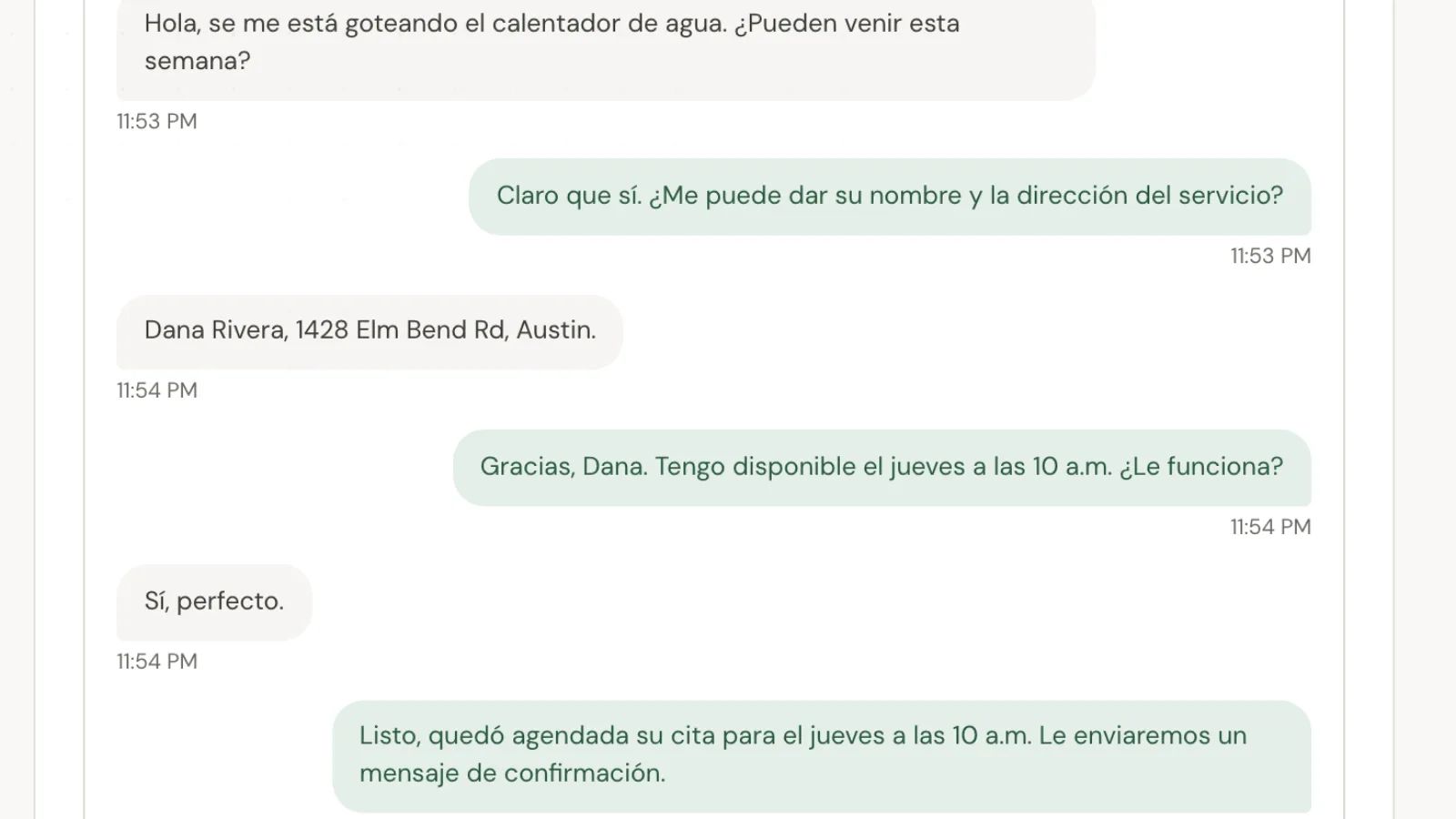
- Every call, text, chat and social message should land in one Inbox and move toward a booked job.
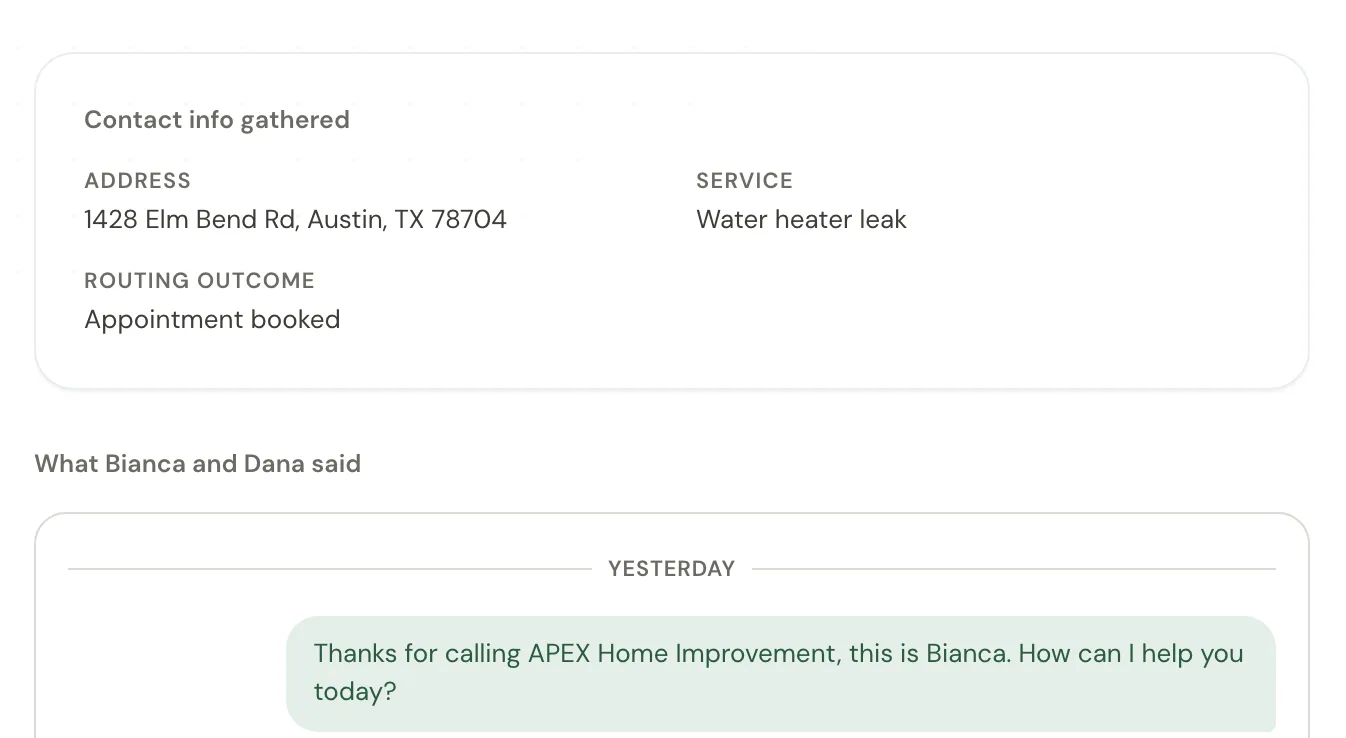
- Look for contact details pulled out automatically, a written record of each conversation, lead status and calendar booking.
- Bianca handles intake in English and Spanish, so customers never switch languages to describe a job or book.
Home service businesses get leads from everywhere: a phone call from a yard sign, a text from a past customer, a chat on the website at midnight, a Facebook message from a neighbor's referral. Each one is a job, if someone answers it.
This guide shows how to bring every channel into one intake workflow, what to look for in an automated lead capture system, and why answering in the customer's language matters.
Unified lead intake and booking
Contractors often ask for the same setup: website chat widgets, automated SMS follow-ups and one place to track every customer. The goal is simple. Every inquiry should get a response, and every response should move toward a booked job.
Bianca, the AI receptionist from Bectify, handles phone calls, website chats, texts and social messages in English and Spanish, and books appointments for small businesses. Here is the intake workflow from first contact to booked job:
- Inquiry: A customer calls, texts, chats on your site, or messages you on WhatsApp, Messenger or Instagram.
- Response: Bianca answers right away, day or night.
- Capture: She collects the customer's name, phone number, address and the service they need.
- Qualification: She asks what the job is and where, so you know what you are walking into before you call back.
- Booking: With Google Calendar or Calendly connected, she books an open time. Without one, she takes the request and emails you the details.
- Confirmation: The customer gets a confirmation text and reminders before the visit.
Every conversation lands in one Inbox as a lead. Bianca recognizes returning customers by phone number, so Monday's call and Thursday's text sit under one contact. You do not need a separate CRM to keep track.
One response workflow also means voice and text leads are handled the same way. A customer who texts gets the same questions and the same booking options as one who calls.
Evaluating lead-capture capabilities
When you set up an automated lead capture system, prioritize the information you will use to follow up. Check for:
- Contact details pulled out automatically: name, phone, address and service, without reading the whole conversation.
- Conversation context: a written record of what the customer said.
- Website qualification: a chat widget that asks qualifying questions and passes the answers into the lead.
- Lead status: a clear view of which leads are new, contacted, booked or lost.
- Handoff details: notes your team can add, and a fast way to call the customer back.
- Booking support: a direct connection to the calendar you already use.
Call transcripts are where most of this comes from. Every call Bianca answers is saved as a written transcript in your Inbox, with the customer's name and number at the top and the other details she gathered just below. Your team can read the call, add notes, call back or mark the lead booked from the same screen. Transcripts are stored with your account. They are text only, with no audio playback.
Bilingual lead capture
Home service businesses in many US markets serve a mix of English- and Spanish-speaking customers. A lead who has to switch languages to describe a problem may give up and call someone else.
Bianca answers phone calls, website chats, texts and social messages in English and Spanish, and can book appointments in either language. That keeps the whole intake in one language for the customer: the question, the qualifying details and the booking.
For the business, every lead still lands in the same Inbox, with the same contact details at the top. One workflow covers both languages.
Related reading
- How Contractors Can Automate Lead Capture Across Calls, Chat, and SMS
- SMS Automation for Home Service Businesses
See how Bianca works for dental offices, med spas and law firms.
Frequently asked questions
Do I need a separate CRM?
Bectify includes a built-in customer list. Every call, text, chat and message becomes a lead, and you can add notes to any conversation, merge duplicates and export your list. It does not sync with outside CRMs or job-management tools yet.
Can I listen to calls?
No. You get a written transcript of every call, with the customer's details pulled out at the top.
Which messaging channels are included?
Phone calls, website chat, texts, WhatsApp, Facebook Messenger and Instagram all land in one Inbox. Two-way texting is on the Core plan.
How do I try it?
New accounts start with a 14-day free trial. See the pricing page for current plans.